Moving from SimplePractice, TherapyNotes, TheraNest or another EHR
Switch EHRs without losing a week.
Your client list comes over from a CSV in minutes, with a preview before anything is saved. Here's exactly what imports, what doesn't, how to plan the switch, and what to do with your old records.
What comes over
What the import reads, and what it doesn't
Most EHRs can export a client list as a CSV file. Cima reads the common column names they use ("Client First Name", "Patient Last Name", "DOB", "Primary Insurance Company", "Member ID" and the like), so you rarely need to edit the file. A spreadsheet you make yourself works too.
| Imports | Details |
|---|---|
| Name | First and last name columns, or one name column ("Rivera, Ana" or "Ana Rivera"). |
| Date of birth | 2001-03-14 or 3/14/2001 style dates. A row without a readable date of birth is listed for you to fix. |
| Contact | Mobile or other phone, email, street address, city, state and ZIP. |
| Insurance | Insurance company, payer ID, member ID and group number. A client with no insurance, or "self-pay", comes in as self-pay. |
| Diagnoses | Up to four ICD-10 codes from a diagnosis column. |
| Sex | From a sex or gender column. |
| Doesn't import | What to do instead |
|---|---|
| Past notes and documents | Keep them in your old system's export. Add the ones you'll need for current clients (latest treatment plan, intake, releases) to each chart's Files tab as an outside record. |
| Past appointments | Book upcoming visits in Cima. History stays in the old system. |
| Open claims and balances | Finish working them in the old system, or your clearinghouse, until they're paid. |
| Old chart numbers | Each client gets a new chart number with your practice's own prefix. |
How the import works
See it before you save it
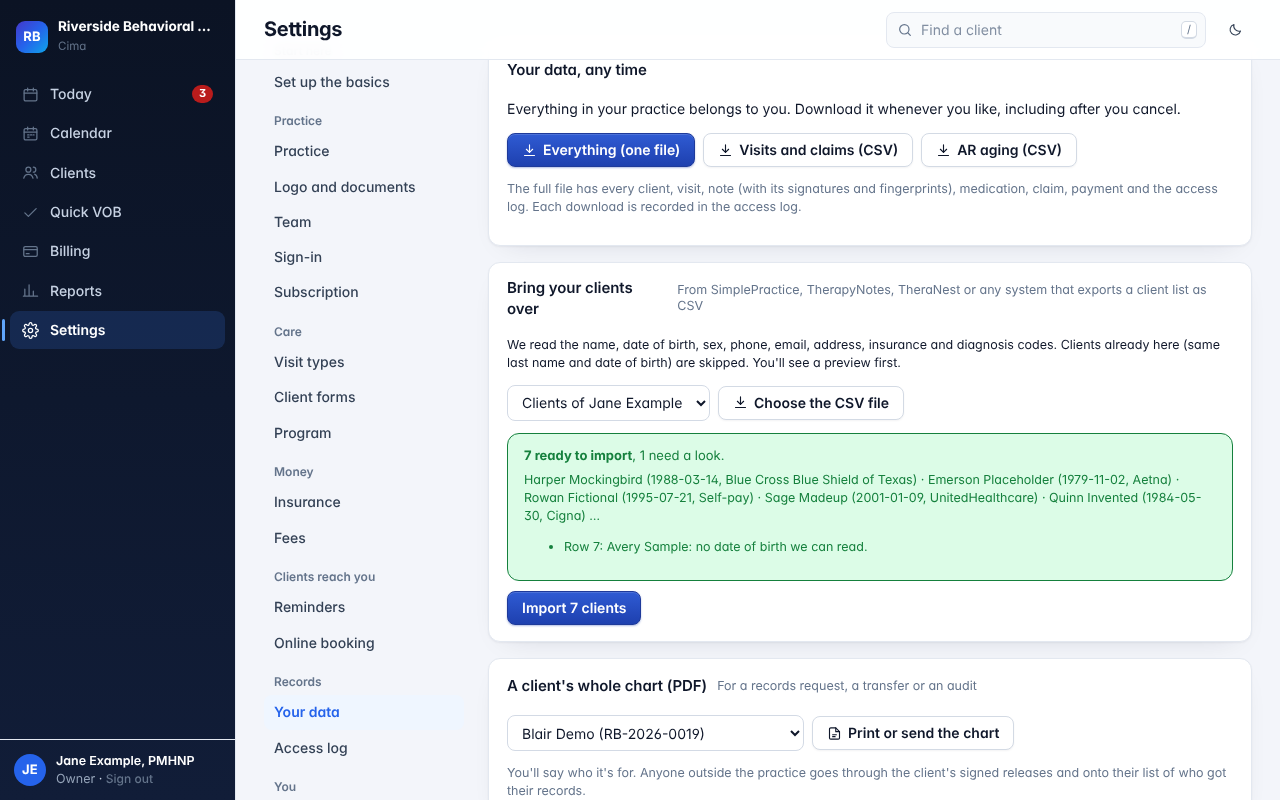
- Settings → Your data → Bring your clients over. Choose whose caseload these clients belong to, then pick the file.
- The preview shows how many are ready, a sample of names, and each row that needs a look, by row number. Nothing is saved until you press Import.
- A client already in Cima (same last name and date of birth) is skipped, so importing the same file twice is safe.
- Up to 3,000 clients per file. Larger lists import in parts.
- The import is recorded in the access log.
The cutover plan
How to switch in about two weeks
Most of the work is setup you do once. Pick a cutover date, usually a Monday, and work back from it.
- Start your trial and work through the setup checklist. Practice NPI, tax ID and address; your NPI and signing PIN; fees and visit types; consents and reminders. Invite your team.
- Start electronic payment sign-up with each payer now. It takes 1 to 3 weeks per payer, so it's the longest step. Until it's done, you post payments by hand.
- Export your client list from the old EHR and import it. Fix the rows the preview lists, and import each clinician's clients to their caseload.
- Download your old records. Get your old system's full export and chart PDFs while your account is open. Add current clients' key documents to their Files tab.
- Check insurance. Run a benefits check for each insured client, and fill in any missing payer IDs with the payer search.
- Send paperwork. Text current clients their Cima forms: details, consents and a PHQ-9 or GAD-7. The signed forms land in their new chart.
- Book the cutover week in Cima and turn reminders on. Share your new booking link.
- From the cutover date, every new visit is documented and billed in Cima. Finish older notes and claims in the old system, and keep it until its last claims are paid.
- Write a fresh treatment plan for each current client at their next visit, carrying over the goals that still fit.
Running an IOP or PHP?
Enter each current client's level of care and authorization before the first group, so attendance, per diem billing and continued-stay reviews start on day one.
What to do with your old records
You still have to keep them for as long as your state and licensing board require, and answer records requests from them.
Download everything
Before you cancel, get the full export and each client's chart as PDFs. Access can end when you cancel, so don't wait.
Store it safely
Keep the files somewhere encrypted that only you control, covered by a BAA if it's a cloud service. Not on a shared drive or in email.
Bring what's current
For active clients, upload the latest treatment plan, intake and releases to their Cima chart, so the record you work from is complete.
No lock-in
Leaving is as easy as arriving
Download your whole practice in one file, with every client, visit, note and its signatures, claim and payment, or any client's chart as a PDF. It works during the trial, after you cancel, and while your account is read-only.
How Cima protects your recordsMoving from a network to your own practice is a different job: your own contracts first, then your clients.
See how to moveQuestions about switching
Can I import my old notes?
No. The import brings your client list: names, dates of birth, contact details, insurance and diagnosis codes. Keep your notes in your old system's export, and upload the documents you need for current clients to their chart's Files tab.
Which EHRs can I import from?
Any that exports a client list as a CSV file, including SimplePractice, TherapyNotes and TheraNest, or a spreadsheet you put together yourself.
What if a row doesn't import?
The preview lists it by row number with the reason, like a missing date of birth. Fix the file and import it again; clients already brought over are skipped.
Do current clients need to sign new consents?
Most practices send current clients Cima's paperwork, so signed consents are in the new chart. It takes them a few minutes on their phone. Your old signed forms stay part of the record you keep from the old system.
How long does switching take?
The import takes minutes. Setup takes an afternoon. Plan about two weeks for the whole switch, mostly waiting on payers to approve electronic payments.
Bring your practice over.
Free for 30 days. Tell us which EHR you're leaving and we'll help you plan the switch.
Get early access