A free buyer's guide from Cima EHR · Choosing software
Mental health practice management software: what it should run, from first call to paid claim
The short answer: mental health practice management software, also sold as behavioral health practice management software, runs the business side of a therapy practice, group or program: scheduling and online booking, reminders, intake paperwork and consents, insurance eligibility checks, charges and claims, payments and statements, staff roles, and the reports you run the practice by. The EHR is the clinical side: assessments, treatment plans and notes. Most mental health systems sell both as one, and for most practices one system is the better buy, because the charge should come from the signed note. Below: each step from first call to paid claim, what the software should do there and who does it, the rules it has to follow, the numbers to watch, what groups and programs add, questions to ask, and what Cima does and doesn't do.
Updated October 28, 2026. From the team that runs a licensed Texas PHP, IOP and outpatient program and built Cima EHR for it. We name no other vendor here. General information, not legal or billing advice.
Practice management software vs an EHR vs billing software
Vendors use "practice management", "EHR" and "EMR" for overlapping products, so sort the work by who does it:
| Part | What it covers | Who works in it |
|---|---|---|
| Practice management | The schedule, booking and reminders; client details and insurance; intake forms and consents; eligibility checks; payments and statements; staff logins and roles; reports | Front desk, owner, biller |
| EHR (the clinical record) | Assessments, diagnoses, treatment plans, progress and group notes, screenings, releases | Clinicians and supervisors |
| Billing (revenue cycle) | Charges, claims, remittances, denials and money owed; usually part of the practice management side | Biller, in house or outside |
| A billing service | People who do the billing for you, often for a share of what they collect | An outside company |
The clinical half is covered in what a behavioral health EHR must do, and the billing half in more depth in behavioral health billing software. This page is the business half: what has to happen between the first phone call and the money in the bank.
From first call to paid claim: what each step needs
Walk a new client through the practice and the software's job becomes plain. At each step, this is what it should do, and who should be doing the part that's left:
| Step | What the software should do | Who does it |
|---|---|---|
| 1. Inquiry and booking | A booking page with each clinician's open hours; a request holds the time until someone accepts it; accepting sends a new client their paperwork | The client, or the front desk |
| 2. Reminders | Text and email at times you choose, confirmed by a reply, with quiet hours and no word about what the visit is for | Automatic |
| 3. Intake paperwork | Details, insurance, consents (treatment, privacy notice, telehealth, financial policy, and a Part 2 consent if you treat substance use) and screenings, signed on the client's phone and kept as a locked copy | The client; the front desk checks it's done |
| 4. Eligibility | A 270/271 check before the visit: active coverage, the behavioral health benefit, deductible and out-of-pocket left, whether authorization is needed | Automatic; the front desk follows up |
| 5. Good faith estimate | An estimate of expected charges for uninsured and self-pay clients, before the service | The front desk |
| 6. The visit | Arrived, completed, no-show or late cancel, with the fee from the policy the client signed | The front desk or the clinician |
| 7. The charge | Created when the clinician signs the note: code, modifiers, place of service, diagnoses and fee, with the code taken from the documented time | The clinician's signature |
| 8. The claim | Checked for what payers reject (NPIs, taxonomy, member ID, diagnosis format, authorization, filing limit), then sent as an 837 through a clearinghouse, with acknowledgments back | The biller |
| 9. Payment posting | The 835 remittance posts payments and adjustments, and denials show their reason codes in plain words | Automatic; the biller works denials |
| 10. The client's share | Statements that leave out diagnoses, card, cash and check payments recorded, superbills for out-of-network clients | The front desk |
| 11. The month's numbers | No-shows, notes signed on time, money owed by age, billed and collected, by clinician and payer | The owner |
The electronic steps use HIPAA's standard transactions, so every payer takes the same formats: claims (837), eligibility (270/271) and remittances (835) under 45 CFR 162.1102, 162.1202 and 162.1602. Our sister site explains how to read a 271 eligibility response, and getting remittances flowing is in ERA and EFT enrollment.
One system or two?
Practice management and the EHR can be one product, or two that sync. For a mental health practice, one system is usually the better buy:
- The code matches the note. When the charge comes from the signed note, a 53-minute session is billed as 90837 and a 40-minute one as 90834, instead of a code picked by habit at the front desk.
- No claim without a note. A visit with no signed note can't become a claim, which is what an auditor checks first.
- Nobody types a visit twice. Appointment, diagnosis, insurance and payment live in one place.
- Program days add up. In an IOP or PHP, a per diem day should bill only when the signed group notes reach the day's hours. That needs the notes and the claim in the same system (per diem billing for IOP and PHP).
Two systems make sense when a billing company runs its own practice management and wants you in it, or when a larger organization already has one. If you run two, ask what syncs (appointments, charges, diagnoses, payments), how often, which system is the source of truth for client details and insurance, and who fixes a mismatch.
The rules practice management software has to follow
- A business associate agreement. Any company that keeps or handles your clients' information for you is a business associate and needs a signed BAA before you use it (45 CFR 164.308(b); HHS on business associates). The vendor's own subcontractors that handle records, such as its texting service and clearinghouse, have to sign the same terms with it; ask who they are.
- Minimum necessary, by role. The front desk and the biller should see what their jobs need and no more (45 CFR 164.502(b)). In a mental health practice that means a billing login that never shows the text of a therapy note.
- Self-pay restrictions. A client who pays in full out of pocket can ask you not to tell their health plan about that service, and you must agree (45 CFR 164.522(a)(1)(vi)). The software should stop that claim from going out.
- Good faith estimates. The No Surprises Act requires an estimate of expected charges for uninsured and self-pay clients (CMS, No Surprises Act). If the software doesn't make one, keep a template of your own.
- Substance use records. Claims and records sent to a payer from a Part 2 program need the client's consent, which since 2024 can be one consent for treatment, payment and operations (the Part 2 guide).
- State rules. Texas, for example, gives you 15 business days to provide a copy of an electronic record after a written request (Health and Safety Code 181.102); the Texas EHR rules list the rest. Payers' filing deadlines are in timely filing limits by payer.
The numbers to run a mental health practice by
Good practice management software turns the week into a handful of numbers you can act on. These are the ones worth a weekly look:
| Number | What it tells you | What to do when it slips |
|---|---|---|
| No-show and late-cancel rate | Whether reminders and your cancellation policy are working | Change reminder timing, and apply the fee the client agreed to |
| Notes signed on time | Claims wait on notes; late notes are late money and audit risk | Look at it by clinician, weekly |
| First-pass claim acceptance | How clean your client data and claim checks are | Fix the field that's rejecting, at intake |
| Denials, by reason and payer | Which step owns the fix, from the reason codes on the remittance (X12 claim adjustment reason codes) | Work them with the denials guide |
| Money owed, by age and payer | What's stuck and for how long | Work the oldest first; see working your AR aging report |
| Billed and collected, by clinician | Caseload balance, and the base for pay in a group | Check caseloads and credentialing by payer |
| Client outcomes | Whether clients are getting better, from repeated screenings such as the PHQ-9 | Review the cases with no change in clinical supervision |
Practice management for group practices and programs
Group practices
- Each clinician sees their own caseload and calendar; the owner sees the whole practice.
- Associates' and interns' notes go to their supervisor to co-sign before the charge is created.
- Claims carry the rendering clinician's NPI under the group's NPI and tax ID.
- Reports by clinician: visits, notes owed, billed and collected.
- Logins for billing and front-desk staff priced clearly, or free.
Cima for group practices shows how those work in Cima.
Behavioral health programs (IOP and PHP)
Behavioral health practice management software for a program adds the census and the program day:
- Census by level of care, and a group schedule by level.
- Attendance hours counted from signed notes, and one per diem charge for each day that meets its hours.
- Authorizations by level of care and units, with the counselor reminded before the last authorized day.
- Admissions with benefits checked for each level of care: Quick VOB does that from a card photo.
- Survey and safety work for licensed programs, such as fire drills and chart reviews: Comply runs those on a schedule.
Our buyer's checklist for IOP and PHP EHRs covers the program side in full, and Cima Consulting's guide to utilization review for IOP and PHP covers the authorization work.
Questions to ask before you buy
- Does the signed note create the charge, with the code from the documented time? Can a claim go out without a signed note?
- Do clients need an app or a password to book, fill in forms or sign consents?
- What do reminder texts say? Can we set quiet hours?
- When is insurance checked, and what does the check show: the behavioral health benefit, deductible, out-of-pocket and authorization?
- Which clearinghouse do you use, and what does each claim, remittance and eligibility check cost?
- Who processes card payments, and at what rate? Can a card be kept on file for late-cancel fees?
- Does it make good faith estimates for self-pay clients?
- What can a billing login see? A front-desk login?
- Which reports come standard, and can every one be exported?
- If it's a separate system from our EHR, what syncs, how often, and who fixes a mismatch?
- What does it cost a month for our practice, every line included, and what can we export if we leave?
For a full scored list, use the therapy practice EHR checklist: 60 checks across scheduling, reminders, paperwork, billing and export.
What practice management software costs
In most mental health systems, practice management is part of the EHR price, charged per clinician. Around it sit per-transaction clearinghouse fees for claims, remittances and eligibility checks; card processing fees from whoever runs the cards; and sometimes setup, texting or add-on fees. A percentage of collections usually means a billing service is bundled in. EHR pricing explained lays out each model and a worksheet for comparing quotes.
Cima EHR's practice management is in every plan:
Solo
+ $39/month for each added clinician
- Calendar, reminders and online booking
- Notes with AI drafting
- Insurance claims and superbills
- Client paperwork by text
Solo PrescriberFor NPs
+ $39/month for each added clinician
- Everything in Solo
- E/M and medication-management coding
- E-prescribing, controlled substances too (coming soon)
- Psychiatric and primary-care templates
Program (IOP / PHP)
+ $39/month for each added clinician
- Everything in Prescriber
- Levels of care and group notes
- Attendance and per diem billing
- Authorizations and continued-stay reviews
Each added clinician is $39 a month; billing and front-desk logins are free. Claims, electronic remittances and eligibility checks are charged at our clearinghouse's standard price:
- Claim sent30¢
- Electronic payment back from the payer (ERA)20¢
- Insurance question to a payer (a benefits check is 1 or more)30¢
- Claim status check30¢
No setup fee and no percentage of what you collect. Every Cima price is on one page.
Practice management in Cima EHR
Cima is one system: the practice management, the clinical record and the billing share the same chart. What it does today, from the feature list:
- Scheduling. Week and day views for one clinician or the whole practice; visit types carry their length and billing code; in person, video or phone; weekly repeats. Arrived, completed, no-show and late cancel, with your late-cancel fee in one click.
- Booking. Your booking page shows each clinician's open hours. A request holds the time until you accept; accepting books the visit, confirms it by text and email, sends a new client their paperwork and checks their insurance. Visits show in Google, Outlook or Apple Calendar without client names, and personal busy times stay off the booking page.
- Reminders. Text and email 3 days, 2 days, 1 day, 4 hours or 2 hours ahead, as you choose; clients reply C to confirm; texts never say what a visit is for. Texting at normal volume is included.
- Intake paperwork. Sent by text or email; the link lasts 7 days, the client confirms their date of birth, and it locks after 5 wrong tries. Consent to treatment, privacy notice, telehealth and financial policy come ready to edit for your state, signed with a finger and kept as a locked PDF. Changes to the client's details wait for your OK.
- Insurance checks. Run automatically the evening before each insured visit, with the deductible and out-of-pocket left.
- Charges and claims. Signing the note creates the charge. Each claim is checked for NPIs, tax ID, taxonomy, payer and member IDs, diagnosis format, authorizations and your filing limit, then sent as an 837P, or an 837I for program days. Acknowledgments and remittances from payers you've enrolled with post themselves; denial reasons show in plain English.
- Payments. Insurance and client payments posted, AR aging by payer, superbills, and statements that leave out diagnoses. A client who paid in full and asked that their plan not be told has that claim blocked.
- Roles. Owner, clinician, billing and front desk, enforced by the server; billing never sees note text or screening results. Billing and front-desk logins are free, and an outside biller gets CSV exports and the 837 file.
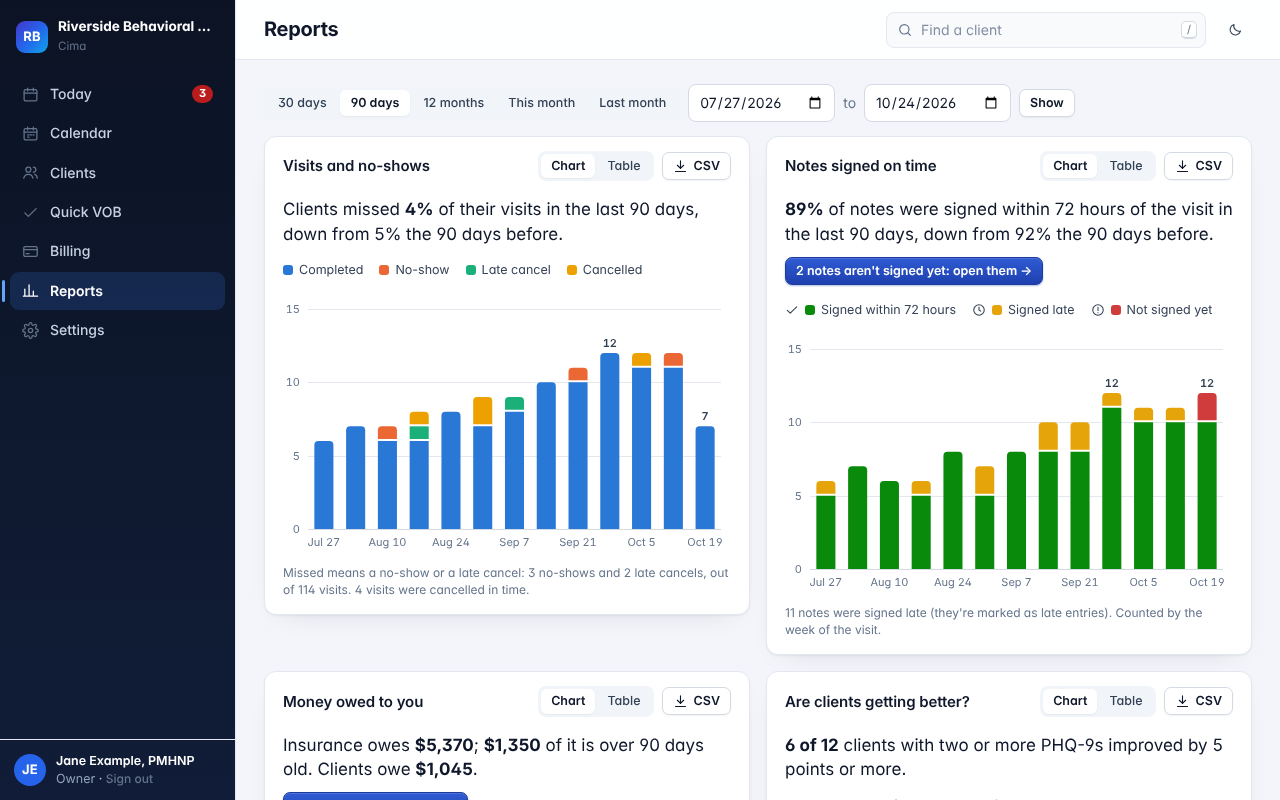
- Reports. Visits and no-show rate, notes signed within 72 hours, money owed by age, billed and collected, first-time claim acceptance, denial reasons, and visits, notes owed, billed and collected by clinician and payer. By week or month against the period before; every chart downloads as a CSV.
What it doesn't do: Cima records card, cash and check payments but doesn't process cards, so you keep your own card processor. It doesn't make good faith estimates yet, and it has no waitlist. Clients get a secure link instead of a portal account. It isn't a billing service, so nobody at Cima works your denials. On the clinical side, video isn't built in and e-prescribing is coming soon, not live.
Run a week of your practice through Cima
Book a visit from your own booking page, send the paperwork to your phone, sign the note and watch the claim build itself. 30 days free, no card to start.
Questions
What is mental health practice management software?
Software that runs the business side of a mental health practice: scheduling and online booking, reminders, intake forms and consents, insurance eligibility checks, charges and claims, payments and statements, staff roles and reports. It's usually sold together with the EHR, the clinical record.
What's the difference between practice management software and an EHR?
Practice management handles the schedule, the client's details and insurance, and the money. The EHR holds the clinical record: assessments, treatment plans, notes and screenings. Most mental health systems combine them, so the charge comes straight from the signed note.
What is behavioral health practice management software?
The same idea, built for mental health and substance use providers. For programs it adds census by level of care, group schedules, attendance hours, per diem billing and authorization tracking, and for substance use records it has to handle 42 CFR Part 2 consents.
Do I need separate practice management software if I have an EHR?
Usually not. If your EHR books, reminds, collects paperwork, checks eligibility, sends claims, posts payments and reports, it is your practice management software. A separate system makes sense mainly when a billing company runs its own.
What is the best practice management software for a therapy practice?
The one your front desk and clients will actually use, that builds the charge from the signed note, that shows one monthly total with every fee, and that lets you export everything. Try it with your own phone as the client before you decide.
Does practice management software need a BAA?
Yes. It holds client names, appointments, diagnoses and insurance, which is protected health information, so the vendor is a business associate and must sign a business associate agreement before you put any client in it.
Can practice management software take card payments?
Many connect to a card processor; ask who it is, the rate, and whether a card can be kept on file for late-cancel fees. Cima records card, cash and check payments but doesn't run cards itself, so you use your own processor.
What reports should practice management software have?
No-show rate, notes signed on time, first-pass claim acceptance, denials by reason and payer, money owed by age and payer, billed and collected by clinician, and client outcomes. Each should export, so you're never stuck with only the vendor's view.
Sources
- eCFR, 45 CFR Part 162, HIPAA transaction standards: claims (162.1102), eligibility (162.1202) and payment and remittance advice (162.1602).
- eCFR, 45 CFR 164.308(b) (business associate contracts), 164.502(b) (minimum necessary) and 164.522(a)(1)(vi) (restriction for services paid in full); HHS, Business Associates.
- CMS, No Surprises Act (good faith estimates for uninsured and self-pay clients).
- X12, Claim Adjustment Reason Codes.
- Texas Health and Safety Code §181.102 (copies of electronic health records).
- Cima EHR's own features as published on features, pricing and security, checked October 28, 2026.
CPT is a registered trademark of the American Medical Association. General information, not legal or billing advice.
The front desk, the chart and the claims in one place.
Free for 30 days. Take the tour first if you like.
Get early access